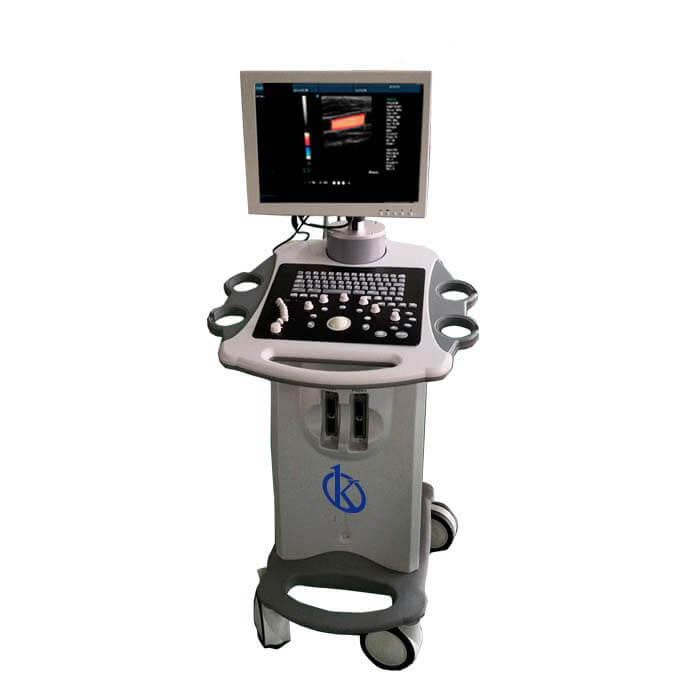
Customization and Advanced Configurations for the YR05153 Portable Ultrasound Scanner
The YR05153 Portable Ultrasound Scanner is designed not just for standard applications, but also for a range of customizable options that enhance its usability and efficiency in clinical settings. This article delves into the various advanced configurations and optional accessories available for the YR05153, ensuring operators can tailor the device to their specific needs.
Technical Specifications of the YR05153
| Model | YR05153 |
|---|---|
| Screen Size | 15 inches LED Color Display |
| Weight | 165 kg |
| Ports | 2 USB Ports, VGA Port, 2 Transducer Ports |
| Hard Drive | 128GB SSD (with optional 200GB SSD) |
| DICOM Protocol | Integrated DICOM 3.0 |
| Imaging Modes | B, 2B, 4B, M, B/C, B/D, CFM, PDI, Triplex, etc. |
Customization Options for the YR05153
The YR05153 offers a variety of customization options that allow users to optimize the device for their specific applications. This includes software upgrades, advanced imaging modes, and various hardware accessories that enhance the operational capabilities of the scanner.
1. Software Upgrades: The YR05153 can be upgraded with additional imaging software that enhances diagnostic capabilities. This includes advanced Doppler imaging features, which are invaluable in cardiology and vascular studies.
2. Imaging Modes: Users can select from multiple imaging modes tailored to specific applications. For instance, the B-mode is ideal for anatomical imaging, while the Doppler modes provide critical information for blood flow analysis.
Optional Accessories for Enhanced Performance
To expand the functionality of the YR05153, several optional accessories are available:
- Transducers: Various transducer options are available for different applications, such as abdominal, cardiac, and vascular imaging.
- Printers: Compatible printing options include USB printers and laser printers to produce hard copies of scans and reports.
- Carrying Cases: Protective carrying cases enhance portability and safeguard the unit during transport.
Advanced Configuration Tips
For optimal performance, configuring the YR05153 accurately is essential. Here are key tips:
1. Leveling the Scanner: Ensure that the scanner is set up on a stable surface to avoid measurement inaccuracies. Use a leveling tool during setup.
2. Network Configuration: Properly configure the Ethernet settings to ensure connectivity for data transfer and remote diagnostics.
3. Calibration: Regular calibration is crucial for maintaining accuracy. Follow the manufacturer’s guidelines for calibration routines.
Use Cases and Sector Adaptations
The YR05153 is versatile and can be adapted for various sectors:
1. Clinical Settings: The scanner is widely used for routine examinations in hospitals, including obstetric and cardiology applications.
2. Veterinary Use: Veterinary clinics benefit from the YR05153 in diagnosing animal health issues with tailored transducers for different species.
3. Educational Institutions: The device serves as an educational tool in nursing and medical training programs, allowing students to gain hands-on experience.
Frequently Asked Questions
What types of imaging modes are available on the YR05153?
The YR05153 offers various imaging modes including B, M, Doppler, and Triplex imaging, catering to a broad range of diagnostic needs.
How can I upgrade the software on my YR05153 scanner?
Software upgrades for the YR05153 can typically be requested through the manufacturer or authorized service providers, ensuring your system has the latest features and functionalities.
What accessories are recommended for the YR05153?
Recommended accessories include specialized transducers for various applications, USB printers for document output, and protective carrying cases for transport.
Can the YR05153 connect to other devices?
Yes, the YR05153 features multiple connectivity options including USB ports and Ethernet connections, enabling it to communicate with printers and networks seamlessly.
What is the importance of regular calibration for the YR05153?
Regular calibration is essential for maintaining the accuracy and reliability of the measurements taken by the YR05153, ensuring optimal performance over time.
How do I troubleshoot common issues with the YR05153?
Common troubleshooting steps include checking the power supply, verifying connections, and consulting the user manual for error codes and recommended solutions.
What are the benefits of using the YR05153 in a veterinary setting?
The YR05153 provides veterinarians with high-quality imaging capabilities that can be customized for various animal species, enhancing diagnostic accuracy and patient care.
If you are looking for a fusion of innovation and quality, you have come to the right place. At Kalstein, we offer you the luxury of exploring our exclusive catalog of laboratory equipment. We manufacture every device to the highest standards of excellence. Our intuitive and seamless online purchasing channels are designed for your convenience, securing the most competitive prices. Hesitate no longer — we bring science to life, it is time to become part of our community.