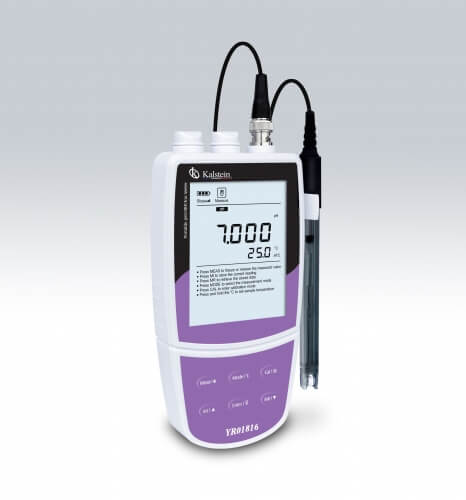
Installation and Commissioning Guide for the YR01817-13 Portable Ammonium Ion Meter
The YR01817-13 Portable Ammonium Ion Meter is a vital tool for accurately measuring ammonium ion concentrations in various environments. This guide provides a step-by-step installation and commissioning process to ensure you achieve the best performance from your device.
Understanding the YR01817-13 Ion Meter
The YR01817-13 is designed for portability while providing high accuracy, with a precision of ±0.5% FS. Equipped with a backlit LCD display, it offers multiple calibration points ranging from 2 to 5, making it suitable for both fieldwork and laboratory settings. Understanding its components and operation is crucial for effective use.
Unboxing Checklist and Initial Setup
Before starting the installation of the YR01817-13, ensure you have the following items:
- Portable Ammonium Ion Meter YR01817-13
- Instruction Manual
- Calibration Solutions (included)
- USB Cable
- 3 AA Batteries or DC 5V Adapter
Once you have verified that all items are present, proceed with the following steps:
- Remove the meter from the packaging carefully.
- Insert batteries or connect the DC adapter to provide power.
- Ensure that no dust or foreign particles are on the meter’s probes.
Power-Up Sequence and Calibration
To power up the YR01817-13, simply press the ON button. Ensure that the calibration of the device is done before its first use. Follow these steps:
- Select the calibration settings from the menu.
- Choose the number of calibration points (2 to 5 points).
- Immerse the probe in the first calibration solution and wait for the device to stabilize.
- Record the reading and repeat the process for the remaining calibration solutions.
Calibration is critical as it establishes a baseline for all measurements, ensuring accuracy in readings.
Common Setup Errors and Solutions
Even with careful handling, setup errors can occur. Here are some common mistakes and how to rectify them:
- Error: Device does not turn on.
- Solution: Check battery installation or ensure the device is plugged in correctly.
- Error: Unstable readings during calibration.
- Solution: Ensure the probe is clean and immersed adequately in the solutions.
| Error Type | Possible Cause | Recommended Solution |
|---|---|---|
| Device Not Powering On | Dead batteries or incorrect power connection | Replace batteries or check the adapter connection |
| Inconsistent Readings | Dirty or damaged probe | Clean the probe or replace if necessary |
| Calibration Failure | Incorrect calibration solutions used | Use the correct calibration solutions |
Technical Specifications of the YR01817-13
| Specification | Details |
|---|---|
| Model | YR01817-13 |
| Concentration Range | 5 × 10⁻⁶ to 1 M, 0.1 to 23000 ppm |
| Accuracy | ± 0.5% FS |
| Calibration Points | 2 to 5 points |
| Measurement Units | ppm, mg/L, mol/L |
| Memory Capacity | Stores up to 500 data sets |
| Power Supply | 3 AA batteries or DC 5V adapter |
Frequently Asked Questions
How often should I calibrate the YR01817-13 ion meter?
Calibration frequency depends on usage. It is recommended to calibrate before each use, especially for critical measurements, or at least once a week for regular use.
What should I do if the readings are inconsistent?
If readings are inconsistent, check for probe cleanliness, ensure the calibration is up to date, and verify that you are using the correct calibration solutions.
Can I use the YR01817-13 in extreme temperatures?
The YR01817-13 is designed to operate within a temperature range of 0 to 105 °C (32 to 221 °F). Operating outside this range may affect performance.
What types of calibration solutions are compatible?
Calibration solutions with ammonium ion standards from 0.001 to 10000 ppm are compatible with the YR01817-13. Ensure to follow the manufacturer’s recommendations for specific solutions.
Is there a warranty on the YR01817-13?
Yes, the YR01817-13 typically comes with a one-year warranty covering manufacturing defects. Check with the supplier for specific warranty terms.
How can I maintain the YR01817-13 for longevity?
To maintain the YR01817-13, keep the probe clean, store it in a safe environment, avoid exposure to extreme conditions, and perform regular calibrations.
Where can I request a quote for the YR01817-13?
To request a quote for the YR01817-13, please visit the relevant sales channel for assistance.
If you are looking for a fusion of innovation and quality, you have come to the right place. At Kalstein, we offer you the luxury of exploring our exclusive catalog of laboratory equipment. We manufacture every device to the highest standards of excellence. Our intuitive and seamless online purchasing channels are designed for your convenience, securing the most competitive prices. Hesitate no longer — we bring science to life, it is time to become part of our community.