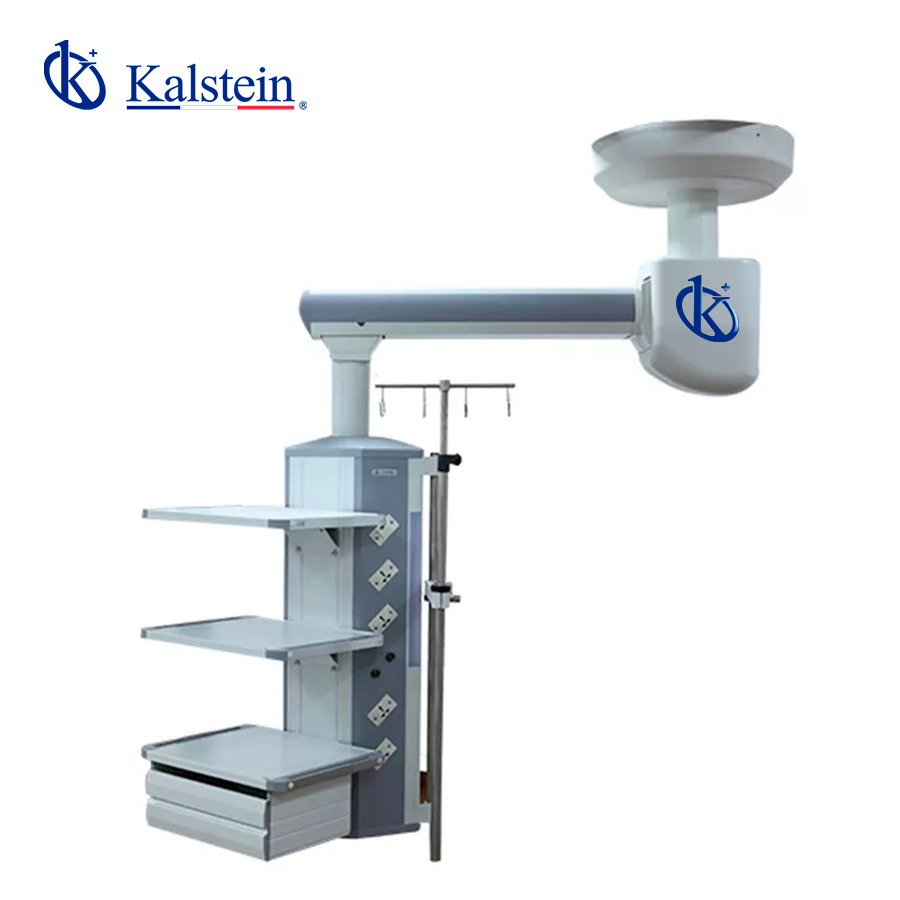
Installation and Commissioning Guide for the YR02077 Single Arm Anesthesia Pendant
The YR02077 Single Arm Anesthesia Pendant is a critical component in modern operating rooms, emergency rooms, intensive care units, and recovery areas. This guide provides a detailed installation and commissioning procedure to ensure optimal performance of the YR02077, enhancing the efficiency of medical staff and patient care.
Understanding the YR02077 Anesthesia Pendant
The YR02077 model features a unique design that allows for versatile use in various clinical settings. Its ceiling-mounted installation provides a rotating arm that can swivel 340°, giving healthcare professionals easy access to necessary equipment and utilities. Understanding its characteristics is crucial for proper installation and functionality.
Technical Specifications of the YR02077
| Specification | Details |
|---|---|
| Model | YR02077 |
| Arm Rotating Radius | 1000 mm |
| Arm Rotating Angle | 340° |
| Braking System | Friction brake |
| Maximum Load Capacity | 160 kg |
| Electrical Sockets | 2 earth studs |
| Standard Configuration | 1 Oxygen, 1 Nitrous Oxide, 1 Air, 1 Vacuum Suction, 1 Exhaust Gas Discharge, 6 10A Power Outlets, 1 Network Socket, 1 Grounding Terminal |
| Weight | 116 kg |
Unboxing and Preparing the YR02077 for Installation
Before beginning the installation process, it is essential to carefully unbox the YR02077 and inspect all components. Ensure that all parts listed in the assembly manual are present. The installation package typically includes the pendant unit, mounting hardware, and an installation manual.
Ensure a clean and spacious work area to facilitate the installation. Proper tools such as a level, drill, and wrenches will be necessary for the installation process.
Ceiling Mounting Procedure
The YR02077 requires a ceiling mount installation. Follow these steps for an effective setup:
- Choose a location on the ceiling that meets the height requirements and ensures accessibility for medical personnel.
- Using the provided mounting template, mark holes on the ceiling for drilling.
- Drill the holes and insert suitable anchors for secure mounting.
- Attach the pendant to the ceiling, ensuring it is level and securely fastened.
- Ensure that the pendant can rotate freely within its specified range.
Connecting Gas and Electrical Supplies
Once the YR02077 is securely mounted, the next step is to connect gas and electrical supplies:
- Identify the gas supply terminals for Oxygen, Nitrous Oxide, Air, and Vacuum Suction. Connect the appropriate hoses from the supply lines to the pendant terminals.
- Connect the electrical wiring according to the specifications outlined in the installation manual. Ensure proper grounding and follow local electrical codes.
- Test each gas outlet to confirm proper flow and pressure. Ensure there are no leaks in the system.
Initial Power-Up and Calibration
After installation, it is vital to power up the YR02077 and perform initial calibration:
- Turn on the main power supply and check for any error codes displayed on the unit.
- Follow the calibration steps provided in the user manual. This may involve adjusting the gas flow rates and confirming operational readiness.
- Document any calibration settings for future reference and compliance.
Troubleshooting Common Installation Issues
During the installation process, several common issues may arise. Below is a table of potential symptoms, causes, and solutions:
| Symptom | Cause | Solution |
|---|---|---|
| Unit does not power on | Electrical connection issues | Check wiring and connections |
| Gas outlets not functioning | Leak in gas lines | Inspect for leaks and repair |
| Inaccurate gas flow readings | Calibration not performed | Refer to calibration section and reset |
Frequently Asked Questions
What environments can the YR02077 be used in?
The YR02077 Single Arm Anesthesia Pendant is suitable for use in operating rooms, emergency rooms, intensive care units, and recovery areas.
How does the YR02077's arm rotation work?
The arm of the YR02077 can rotate within a range of 340°, allowing for flexible positioning of medical equipment and utilities according to the needs of healthcare personnel.
What is the maximum load capacity of the YR02077?
The YR02077 has a maximum load capacity of 160 kg, making it suitable for a variety of medical equipment.
Can the gas outlets be customized?
Yes, the YR02077 allows for the selection of different types of gas outlets, including oxygen, nitrous oxide, air, and vacuum suction, based on user requirements.
What maintenance is required for the YR02077?
Regular checks and calibration of the gas supply and electrical connections are recommended to ensure the YR02077 operates effectively and safely.
How do I request a quote for the YR02077?
You can request a quote for the YR02077 Single Arm Anesthesia Pendant through our customer service channels, ensuring you receive the best price available.
Where can I find replacement parts for the YR02077?
Replacement parts can be found through authorized distributors and directly from the manufacturer. Ensure you use genuine parts to maintain the functionality of the YR02077.
If you are looking for a fusion of innovation and quality, you have come to the right place. At Kalstein, we offer you the luxury of exploring our exclusive catalog of laboratory equipment. We manufacture every device to the highest standards of excellence. Our intuitive and seamless online purchasing channels are designed for your convenience, securing the most competitive prices. Hesitate no longer — we bring science to life, it is time to become part of our community.