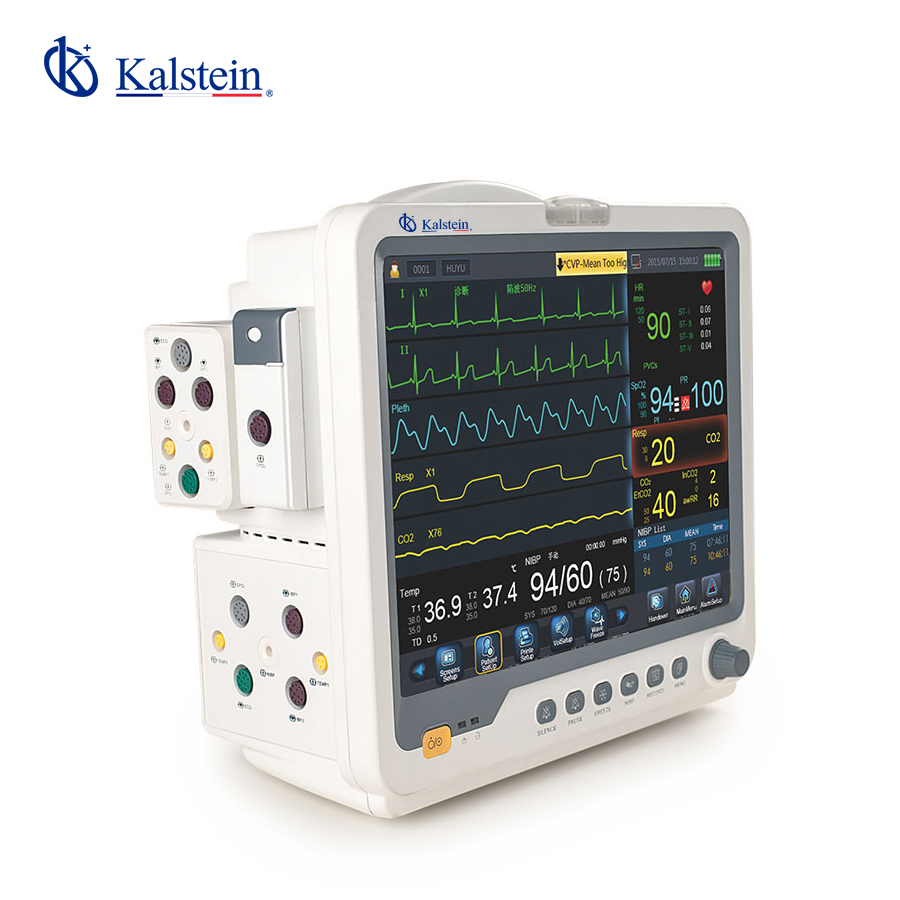
Installation and Commissioning Guide for the YR02179 Patient Multi-Parameter Monitor
The YR02179 Patient Multi-Parameter Monitor is designed for critical care environments such as Operating Rooms (OR) and Intensive Care Units (ICU). This guide provides a comprehensive overview of the installation and commissioning process of the YR02179, ensuring optimal performance and reliability.
Unboxing and Initial Setup
Before the installation of the YR02179, it is critical to properly unbox and check the contents of the package. An unboxing checklist includes:
- YR02179 Monitor
- Power Cable
- User Manual
- Probe and Accessories
- Calibration Equipment (if applicable)
Inspect for any physical damage. If any items are missing or damaged, contact the supplier for resolution.
Site Preparation and Environmental Considerations
Ensure that the installation site meets the following environmental conditions:
- Temperature range: 0°C to 40°C
- Humidity: 15% to 95% non-condensing
- Voltage: Confirm compatibility with power supply
- Clearances: Maintain a distance of at least 30 cm from walls
A site-prep checklist is useful for reference during the installation. This checklist should be completed before moving forward with the installation.
Mounting and Anchoring the YR02179
Decide on the best location for mounting the YR02179 monitor. The monitor can be mounted on a wall or placed on a cart. Ensure the mount is secure and capable of supporting the device's weight of 7 kg. Use appropriate fixtures for wall mounting to prevent accidents.
Power-Up Sequence and Initial Calibration
Once the monitor is securely mounted or positioned, connect the power cable and ensure that the device is plugged into an appropriate power outlet. Follow these steps for the initial power-up and calibration:
- Press the power button located on the front of the device.
- Wait for the self-diagnostic check to complete.
- Proceed with any calibration required for connected probes and accessories.
Calibration procedures may vary based on additional modules and accessories connected to the YR02179.
Network and Data Connectivity
For devices that support data connectivity, ensure that the network settings are configured correctly. The YR02179 can connect via Wi-Fi or Ethernet based on the facility’s infrastructure. Follow the specific connectivity guides provided in the user manual to set up the network connection.
Validating First Measurement and Troubleshooting Common Setup Issues
Immediately after calibration, validate the first measurement by running a test with a known standard. Compare the readings with expected values to ensure accuracy. If you encounter issues, review the following common problems:
| Symptom | Probable Cause | Solution |
|---|---|---|
| Monitor does not power on | Power cable not connected | Check power connections |
| Calibration fails | Improper probe connection | Reconnect probes and recalibrate |
| Inaccurate readings | Faulty sensor or probe | Replace the sensor or probe |
Technical Specifications of the YR02179
| Specification | Detail |
|---|---|
| Model | YR02179 |
| Brand | Kalstein |
| Category | Patient Monitor |
| Price USD | $1375.00 |
| Weight | 7 kg |
| Dimensions | 42.5 x 32 x 41 cm |
Frequently Asked Questions
What are the standard parameters measured by the YR02179 monitor?
The YR02179 monitor measures several critical parameters including ECG, SpO2, temperature, NIBP, respiration rate, and pulse rate/heart rate. Each of these parameters is crucial for patient monitoring in critical care environments.
How do I calibrate the YR02179 for initial setup?
Calibration for the YR02179 involves connecting the appropriate sensors and following the calibration steps provided in the user manual. It is important to ensure that the probes are correctly connected before starting the calibration process.
What should I do if the monitor displays an error code during operation?
If the YR02179 displays an error code, consult the user manual for troubleshooting steps specific to that code. Common solutions may involve checking connections or recalibrating sensors.
Can I connect the YR02179 to a hospital network?
Yes, the YR02179 can be connected to a hospital network via Wi-Fi or Ethernet. Follow the network setup instructions in the user manual for a successful connection.
What is the expected lifespan of the YR02179 monitor?
The expected lifespan of the YR02179 monitor is typically around 7 to 10 years, depending on usage and maintenance. Regular servicing and adherence to maintenance guidelines can extend its operational life.
Is there a warranty for the YR02179 monitor?
The YR02179 monitor comes with a standard warranty that covers defects in materials and workmanship. For specific warranty details, consult the warranty card included in the user manual.
If you seek a fusion of innovation and quality, you have come to the right place. At Kalstein, we offer you the luxury of exploring our exclusive catalog of laboratory equipment. We manufacture every device to the highest standards of excellence. Our intuitive and seamless online purchasing channels are designed for your convenience, securing the most competitive prices. Hesitate no longer — we bring science to life, it is time to become part of our community.