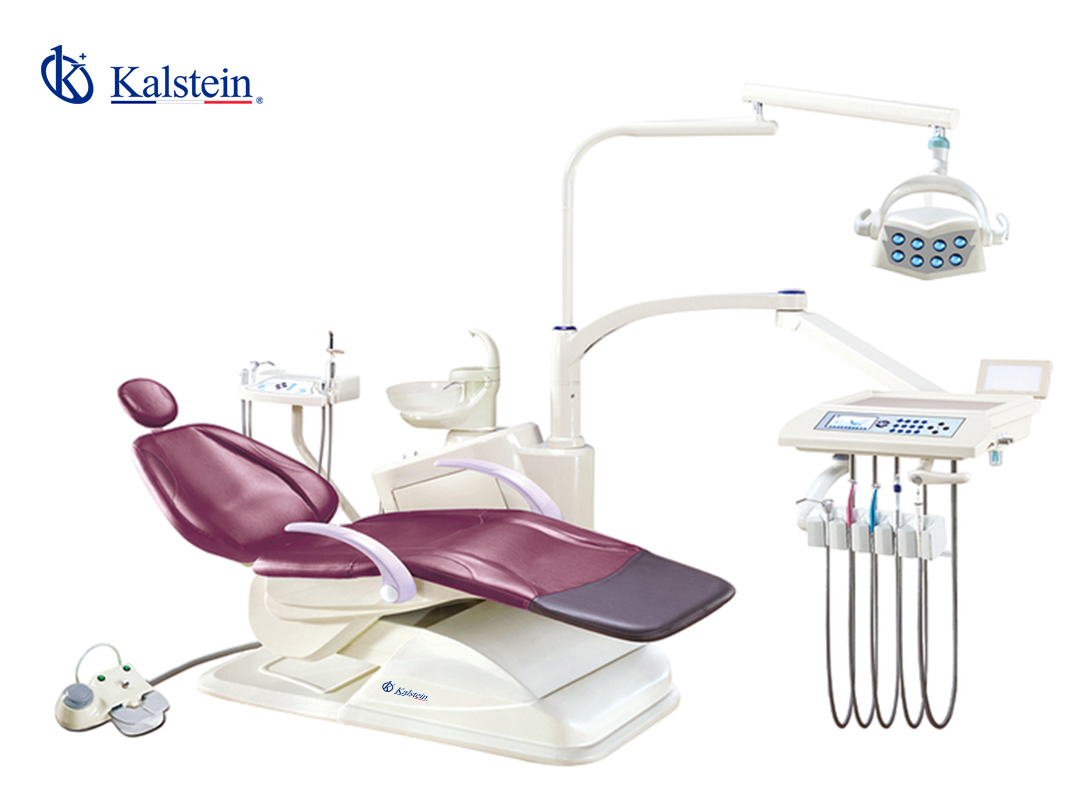
Installation and Commissioning Guide for the YR06009 Dental Unit
The YR06009 Dental Unit is engineered for efficiency and safety in dental practices. This guide aims to assist operators with the installation and commissioning process, ensuring that the unit operates at its best from the very start. Proper setup is crucial for maximizing the performance of the YR06009, preventing common issues, and enhancing patient experience.
Unboxing and Initial Setup
Upon receiving the YR06009 Dental Unit, the first step is to carefully unbox all components. Ensure the following items are included:
- Dental chair with integrated controls
- Handpiece locking mechanism
- Patient suction system
- Touchscreen control panel
- Water supply system
- Power cables and connectors
- Installation manual
Inspect all components for any visible damage. If any issues are detected, contact your supplier immediately.
Site Preparation and Requirements
| Requirement | Details |
|---|---|
| Power Supply | Ensure a dedicated power source with a voltage of 24V DC, compatible with the YR06009. |
| Space | Allocate sufficient space around the unit for easy access and operation. Recommended clearance is 1 meter on all sides. |
| Ventilation | Ensure proper ventilation to maintain optimal temperature during operation. |
| Water Supply | Connect to a clean water supply for the dental unit's water system. |
Anchoring and Leveling
Once the unit is unboxed and the site is prepared, it is time to install the dental chair. Follow these steps:
- Position the chair in the designated area based on previous site preparation.
- Use the leveling feet to adjust the chair so that it is stable and level.
- Secure the base by anchoring it to the floor using appropriate fasteners to prevent movement during operation.
Proper anchoring ensures safety and reduces the risk of accidents.
Power-Up Sequence and First-Run Calibration
After the YR06009 is securely anchored and leveled, you can proceed with the power-up:
- Connect the power cable to the dental unit.
- Turn on the power switch located at the rear of the control panel.
- Allow the unit to self-check and initialize all systems.
- Calibrate the functions, including the handpiece locking mechanism and suction settings, as per the user manual.
Ensure each function responds correctly to the control panel inputs before moving on to operational testing.
Common Setup Mistakes to Avoid
During installation, avoid these common pitfalls:
- Not leveling the dental chair, which can lead to patient discomfort.
- Improper power connections that may result in equipment failure.
- Neglecting to check water connections, leading to leaks or system failures.
- Failing to follow the calibration steps which can affect the unit’s functionality.
Technical Specifications of the YR06009
| Model | YR06009 |
|---|---|
| Brand | Kalstein |
| Category | Dental Units |
| Price (USD) | $2130.00 |
| Weight (Gross) | 241 kg |
| Dimensions | 145 x 102 x 115 cm |
Frequently Asked Questions
What should I do if the YR06009 dental unit does not power on?
If the unit does not power on, check the power supply connections and ensure that the power switch is turned on. Also, verify that the electrical outlet is functioning properly. If the problem persists, inspect the internal fuses.
How do I ensure the water supply is functioning correctly?
Ensure that the water supply is properly connected and check for any kinks in the tubing. Activate the water system from the control panel and listen for the pump's noise. If the system does not engage, inspect all connections.
What safety features are included in the YR06009?
The YR06009 includes a handpiece locking mechanism and an anti-collision feature for the chair's backrest, which prevents accidents during patient treatment.
How often should I perform maintenance on the YR06009 dental unit?
Regular maintenance should be performed every six months to ensure optimal performance. This includes checking the water supply, electrical connections, and cleaning the suction system.
Can I upgrade the YR06009 with additional features?
Yes, the YR06009 supports various optional accessories and features, such as advanced suction systems and enhanced control panels for better functionality.
What is the warranty period for the YR06009 dental unit?
The YR06009 comes with a standard warranty of one year, covering parts and labor for any manufacturing defects. Extended warranty options may be available upon request.
If you are looking for a fusion of innovation and quality, you have come to the right place. At Kalstein, we offer you the luxury of exploring our exclusive catalog of laboratory equipment. We manufacture every device to the highest standards of excellence. Our intuitive and seamless online purchasing channels are designed for your convenience, securing the most competitive prices. Hesitate no longer — we bring science to life, it is time to become part of our community.