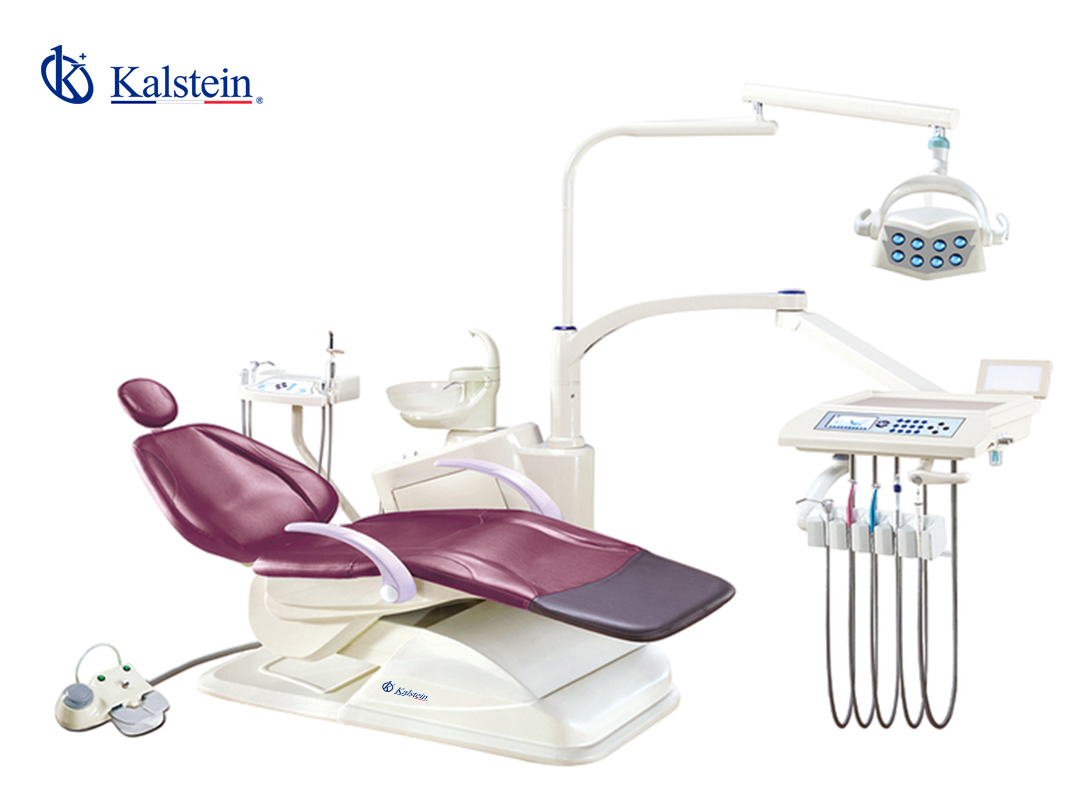
Installation and Commissioning Guide for the YR06009 Efficient Work Dental Unit
The YR06009 Efficient Work Dental Unit is designed to enhance the dental treatment experience with its innovative features and ergonomic design. This guide provides a detailed overview of the installation and commissioning process, ensuring that dental professionals can set up this unit efficiently and safely.
Understanding the YR06009 Dental Unit
The YR06009 dental unit is an integrated treatment chair that boasts advanced functionalities aimed at improving patient comfort and the efficiency of dental procedures. Its perfect backrest design, super-sensitive touch screen, and multifunctional operation make it an essential tool in modern dental practices.
Technical Specifications of the YR06009
| Model | YR06009 |
|---|---|
| Brand | Kalstein |
| Category | Dental Units |
| Price (USD) | 2130.00 |
| Weight (Gross) | 241 kg |
| Dimensions | x x |
| Package Size | 145 x 102 x 115 cm |
Unboxing and Setup Checklist
Before installation, ensure you have all components listed below:
- YR06009 Dental Unit
- Instruction Manual
- Power Cable
- Foot Control
- Dental Accessories Kit
Once unboxed, follow these steps for setup:
- Place the dental unit on a stable platform.
- Connect the power cable to a suitable electrical outlet.
- Attach the foot control to the designated socket on the unit.
- Ensure all dental accessories are securely fitted.
Anchoring and Leveling the Unit
Proper anchoring and leveling are critical for the safe operation of the YR06009. Here’s how to ensure the unit is stable:
- Use a spirit level to check the flatness of the floor.
- Adjust the leveling feet at the base of the dental unit as necessary.
- Secure the unit to the floor using appropriate anchors if required by the setup location.
Power-Up Sequence and Calibration
To power up the YR06009 and perform initial calibrations, follow these steps:
- Turn on the main power switch located at the back of the unit.
- Wait for the system to initialize — this may take a few moments.
- Access the touch screen interface and navigate to the setup menu.
- Follow on-screen instructions to calibrate the unit — ensure to check memory settings and operational modes.
Common Setup Mistakes and How to Avoid Them
It’s essential to be aware of common pitfalls during the installation of the YR06009:
- Improper Leveling: Always ensure the unit is level before operation.
- Neglecting Power Requirements: Verify voltage compatibility with the local supply before connecting.
- Incorrect Accessory Installation: Refer to the manual for details on accessory configurations.
Frequently Asked Questions
What are the key features of the YR06009 Efficient Work Dental Unit?
The YR06009 features include a multifunctional operation with a super-sensitive touch screen, ergonomic design for enhanced patient comfort, and a locking function for handpieces to prevent accidents during treatment.
How should I maintain the YR06009 after installation?
Regular maintenance includes cleaning the unit after each use, conducting quarterly checks on electrical components, and ensuring the calibration settings are up to date to maintain optimal performance.
Can the YR06009 be adapted for different dental procedures?
Yes, the YR06009 can be configured for various dental procedures by utilizing optional accessories and adjusting the operational modes to suit specific treatment requirements.
What safety features does the YR06009 include?
The YR06009 includes an anti-collision feature, ensuring safety for both patients and operators during procedures, as well as a secure locking mechanism for handpieces.
What is the warranty coverage for the YR06009?
The YR06009 typically comes with a standard warranty that covers defects in material and workmanship. Always refer to the warranty documentation for specific terms.
How can I request a quote for the YR06009?
You can easily request a quote for the YR06009 by reaching out through the contact options available on our site. Our sales team will provide you with the required information.
What should I do if I encounter an error during operation?
If you encounter an error, refer to the troubleshooting section in the manual. Common errors can often be resolved by resetting the unit or checking the connections.
Conclusion
If you are looking for a fusion of innovation and quality, you have come to the right place. At Kalstein, we offer you the luxury of exploring our exclusive catalog of laboratory equipment. We manufacture every device to the highest standards of excellence. Our intuitive and seamless online purchasing channels are designed for your convenience, securing the most competitive prices. Hesitate no longer — we bring science to life, it is time to become part of our community.