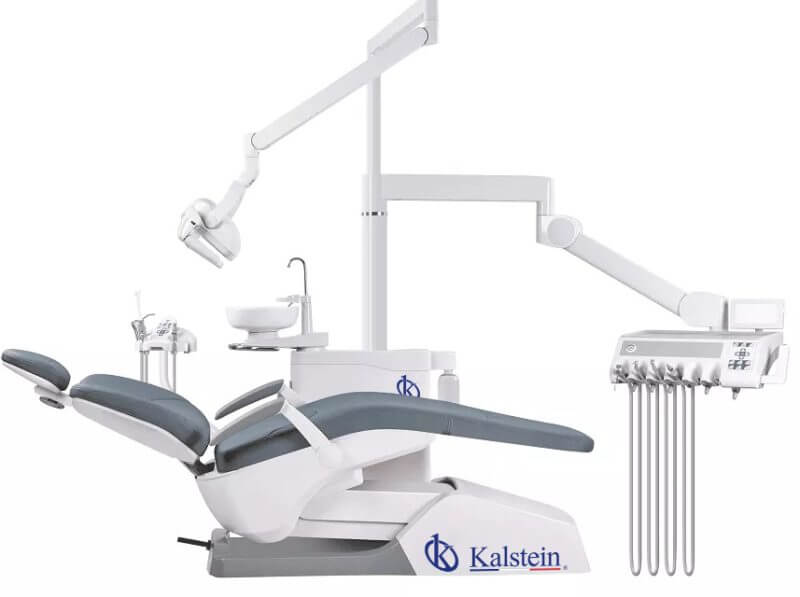
Installation and Commissioning Guide for the YR06012 Dental Chair
The YR06012 Dental Chair is a sophisticated piece of equipment designed for modern dental practices. Its features include ergonomic design, advanced functionality, and luxurious aesthetics, making it ideal for high-end clinics. This guide aims to provide a comprehensive overview of the installation and commissioning process to ensure optimal performance and safety.
Unboxing the YR06012 Dental Chair
Before commencing the installation, it is crucial to properly unbox the YR06012 Dental Chair. Follow these steps for a successful unboxing:
- Carefully cut open the packaging and remove any protective coverings.
- Inspect all components for signs of damage during transit.
- Ensure you have all items listed in the inventory checklist provided in the packaging.
Assembly and Setup
Once unboxed, the next step is to assemble and set up the chair:
- Positioning: Choose a suitable location in your dental practice that allows for easy access to power and water supplies.
- Anchoring: Ensure the chair is securely anchored to the floor to prevent movement during operation. Use appropriate fastening materials based on your flooring type.
- Leveling: Adjust the legs of the chair to ensure it is level and stable.
Power-Up Sequence
After the chair is securely in place, follow the power-up sequence:
- Connect the chair to a power source, ensuring all connections are secure.
- Switch on the main power supply.
- Activate the dental chair using the foot pedal or control panel.
Calibration and Initial Setup
Calibrating the YR06012 is essential for precise operation:
- Set the desired parameters for the LED light and chair positioning using the control panel.
- Conduct a test run to ensure all functions are operational, including the reclining mechanism and the ceramic cuspidor.
- Check and adjust the water supply and suction mechanisms for optimal performance.
Common Setup Mistakes and Troubleshooting
During the installation, it's important to be aware of common mistakes:
- Improper Anchoring: Ensure the chair is firmly anchored to avoid instability.
- Neglecting Calibration: Always calibrate the chair before first use to avoid operational issues.
If you encounter issues, refer to the troubleshooting table below:
| Symptom | Probable Cause | Solution |
|---|---|---|
| Chair does not power on | Power connection issues | Check power supply and connections. |
| Inconsistent chair positioning | Calibration not performed | Recalibrate the chair. |
| Water supply issues | Blocked or faulty connections | Inspect and clear connections. |
Technical Specifications of the YR06012
| Specification | Details |
|---|---|
| Model | YR06012 |
| Power Supply Voltage | 220V-50Hz / 110V-60Hz |
| Motor Voltage | 24V |
| Air Pressure | 0.5mpa-0.8mpa |
| Water Pressure | 0.2mpa-0.4mpa |
Frequently Asked Questions
What are the key features of the YR06012 Dental Chair?
The YR06012 Dental Chair features ergonomic design, a luxurious appearance, and advanced functionalities such as LED lighting, water supply systems, and customizable positions for both patient and dental practitioner.
How do I ensure the safety of the YR06012 during operation?
Always ensure that the chair is properly anchored and calibrated. Pay attention to the safety features, such as the locking mechanism for the cuspidor and hand pieces, to ensure a secure operating environment.
What should I do if the YR06012 fails to power on?
Check your power supply and connections to ensure everything is securely plugged in. If problems persist, refer to the troubleshooting guidelines provided in the installation manual.
How do I maintain the YR06012 Dental Chair?
Regular maintenance includes checking and cleaning the water supply and suction systems, inspecting the upholstery for wear and tear, and ensuring all electronic components are functional.
Can the YR06012 be customized for different dental procedures?
Yes, the YR06012 has optional accessories and configurations that can be tailored to meet the specific needs of different dental procedures, enhancing its versatility in clinical settings.
What is the warranty period for the YR06012 Dental Chair?
The YR06012 typically comes with a standard warranty covering manufacturing defects and parts for a specific duration, as detailed in the warranty documentation provided upon purchase.
How do I request support for the YR06012?
You can request support through your dealer or contact the manufacturer's customer service for assistance with installation, troubleshooting, or maintenance queries.
If you are looking for a fusion of innovation and quality, you have come to the right place. At Kalstein, we offer you the luxury of exploring our exclusive catalog of laboratory equipment. We manufacture every device to the highest standards of excellence. Our intuitive and seamless online purchasing channels are designed for your convenience, securing the most competitive prices. Hesitate no longer — we bring science to life, it is time to become part of our community.