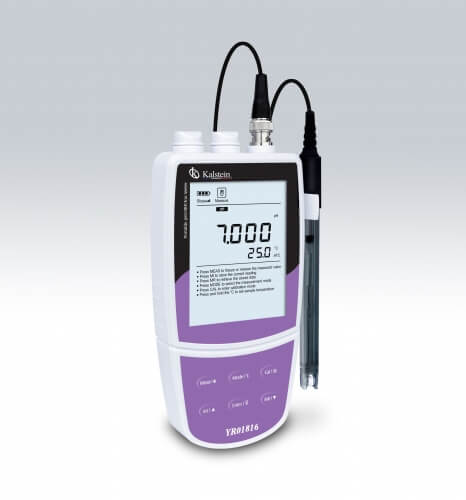
Installation and Startup Guide for the YR01817-4 Portable Ammonium Ion Meter
The YR01817-4 Portable Ammonium Ion Meter is a professional-grade device designed for outdoor applications, offering precision measurements with 0.5% FS accuracy. This guide will navigate you through the essential steps to install and correctly start up your YR01817-4, ensuring that you achieve reliable results right from the first use.
Understanding the YR01817-4: Overview and Key Features
The YR01817-4 is equipped with an illuminated LCD screen, facilitating visibility in various lighting conditions. It supports calibration from 2 to 5 points across a range of concentrations, making it highly versatile for different applications. With selectable units of concentration (PPM, MG/L, MOL/L), automatic temperature compensation, and capabilities for up to 500 data sets storage, this meter is engineered for efficiency and accuracy.
Unboxing and Initial Setup
Upon receiving your YR01817-4, it is crucial to perform an unboxing checklist to ensure all components are included and undamaged. Your package should contain:
- YR01817-4 Portable Ammonium Ion Meter
- Calibration solutions
- USB communication cable
- 3 AA batteries or a power adapter
- User manual
Once confirmed, follow these steps to set up the device:
- Insert the batteries or connect the DC power adapter to power the device.
- Set the calibration points according to the specific requirements of your measurements.
- Ensure the meter is leveled on a stable surface before power-up.
Calibration Process for the YR01817-4
Calibration is a critical step before utilizing the YR01817-4 for measurements. Follow these steps for an effective calibration:
- Turn on the device and navigate to the calibration menu.
- Select the number of calibration points (2 to 5) based on your needs.
- Use the calibration solutions provided, starting from the lowest concentration to the highest.
- After each measurement, confirm the reading on the display to ensure accuracy.
- Save the calibration settings before exiting the menu.
First Measurement: Conducting Your Initial Test
After successful calibration, the YR01817-4 is ready for its first measurement. Ensure the following:
- The electrode is cleaned and properly installed.
- The meter is set to the correct concentration unit.
- The environment is stable, avoiding strong vibrations or electromagnetic interference.
To take a measurement:
- Immerse the electrode in the sample solution.
- Allow the reading to stabilize; the meter will automatically detect the endpoint.
- Note the displayed value and record it if necessary.
Troubleshooting Common Issues with the YR01817-4
In case of errors or unexpected results, refer to this troubleshooting guide:
| Symptom | Probable Cause | Solution |
|---|---|---|
| Device does not power on | Battery low or faulty connection | Check battery installation, replace batteries if necessary |
| Error code E-03 | Calibration needed | Re-calibrate the device using fresh calibration solutions |
| Inconsistent readings | Electrode contamination or wear | Clean or replace the electrode as needed |
Frequently Asked Questions
What types of solutions can be used with the YR01817-4?
The YR01817-4 can be used with various ammonium ion solutions, including calibration standards ranging from 0.001 to 10000 PPM. Ensure that the solutions are compatible with the electrode material.
How often should I calibrate the YR01817-4?
Calibration frequency depends on usage and environmental conditions. It is recommended to calibrate before each use for critical measurements or at least once a week for regular use.
Can the YR01817-4 store measurement data?
Yes, the YR01817-4 can store up to 500 datasets, allowing you to track measurements over time and ensuring accurate record-keeping for analysis.
What are the temperature and environmental tolerances for the YR01817-4?
The device operates efficiently at temperatures between 0 to 105 °C (32 to 221 °F) and should be kept in a stable environment to ensure accurate readings.
How do I change the measurement units on the YR01817-4?
You can change the measurement units by accessing the settings menu and selecting from the available options: PPM, MG/L, or MOL/L, depending on your measurement needs.
What maintenance is needed for the YR01817-4?
Regular maintenance includes cleaning the electrode after each use, checking battery levels, and performing calibrations to ensure accuracy. Refer to the user manual for detailed maintenance instructions.
If you are looking for a fusion of innovation and quality, you have come to the right place. At Kalstein, we offer you the luxury of exploring our exclusive catalog of laboratory equipment. We manufacture every device to the highest standards of excellence. Our intuitive and seamless online purchasing channels are designed for your convenience, securing the most competitive prices. Hesitate no longer — we bring science to life, it is time to become part of our community.