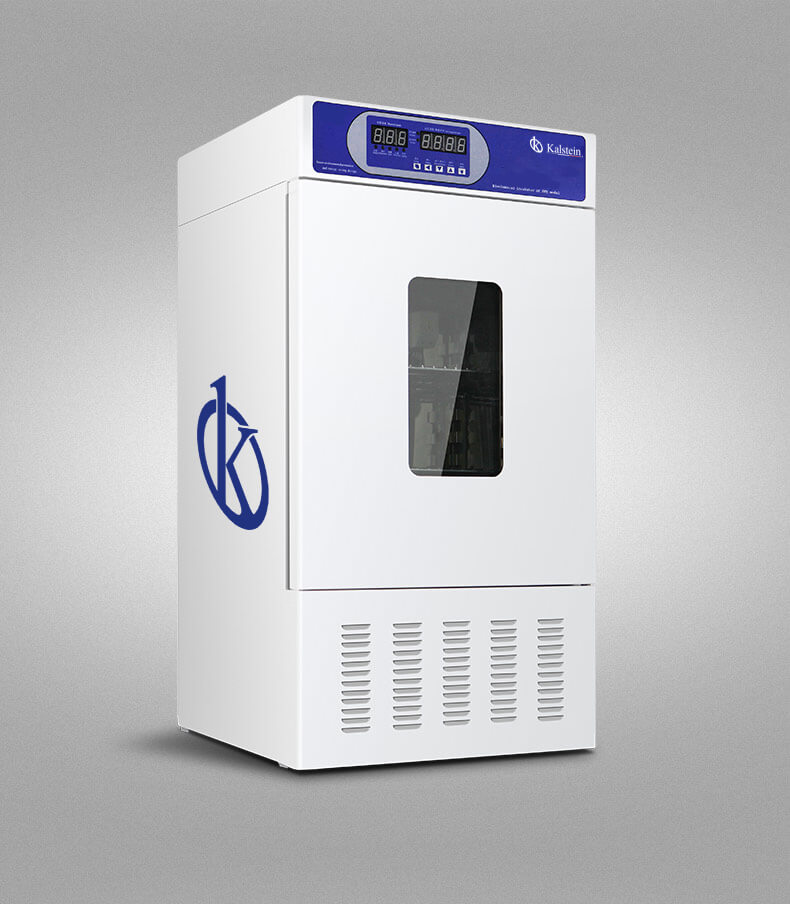
Troubleshooting Common Errors with the YR02041 Bacterial Incubator
The YR02041 Bacterial Incubator is a vital piece of laboratory equipment used in various applications ranging from drug testing to environmental monitoring. However, like any sophisticated instrument, issues can arise during its operation. This guide aims to help users troubleshoot common errors associated with the YR02041 by providing a symptom-focused approach to diagnosing and resolving potential problems.
Technical Specifications of the YR02041
| Model | Temperature Range (℃) | Accuracy (℃) | Fluctuation (%) | Voltage (V) | Power (KW) | Internal Size (mm) (H*W*D) | Total Dimensions (mm) (H*W*D) | Packaging Size (mm) (H*W*D) | Net Weight (KG) | Shipping Weight (KG) |
|---|---|---|---|---|---|---|---|---|---|---|
| YR02041 | 0~60 | ±0.5 | ±1 | 220 | 0.35 | 580×450×380/100L | 1100×590×620 | 1220×670×700 | 90 | 98 |
Troubleshooting Symptoms
Understanding common symptoms can help users quickly identify potential issues with the YR02041. Below, we will analyze specific symptoms, probable causes, and effective solutions.
Equipment Does Not Power On
If the incubator fails to power on, this could be due to several factors, including power supply issues or internal malfunctions.
- Probable Causes:
- Power cable not connected properly.
- Faulty power source.
- Internal fuse blown.
- Diagnostic Steps:
- Check the power cable connections.
- Test the power outlet with another device.
- Inspect the internal fuse and replace if necessary.
- Solutions:
- Reconnect the power cable securely.
- Replace the blown fuse.
- Contact a technician if the issue persists.
- Probable Causes:
- Sensor malfunction.
- Loose wiring connections.
- Diagnostic Steps:
- Inspect the sensor for visible damage.
- Check wiring connections for security.
- Solutions:
- Replace the temperature sensor if damaged.
- Reconnect any loose wires properly.
- Probable Causes:
- Improper calibration.
- External temperature influence.
- Diagnostic Steps:
- Check calibration settings.
- Verify ambient temperature around the incubator.
- Solutions:
- Recalibrate the incubator according to the manufacturer's guidelines.
- Ensure the incubator is placed in an environment free from external temperature fluctuations.
- Probable Causes:
- Faulty thermostat.
- Excessive door openings.
- Diagnostic Steps:
- Check the thermostat settings for accuracy.
- Monitor the frequency of door openings during operation.
- Solutions:
- Replace the thermostat if faulty.
- Limit the frequency of door openings to maintain temperature stability.
Error Code E-03
Error code E-03 indicates a temperature sensor fault. This issue can disrupt the incubator's functionality.
Inconsistent Temperature Readings
Inconsistent readings can lead to inaccurate experimental results.
Frequent Overtemperature Alarms
Overtemperature alarms may indicate that the incubator is failing to maintain the desired temperature.
Symptom to Solution Matrix
| Symptom | Probable Causes | Solutions |
|---|---|---|
| Equipment Does Not Power On | Power cable not connected, faulty power source, internal fuse blown | Reconnect power cable, test outlet, replace fuse |
| Error Code E-03 | Sensor malfunction, loose wiring connections | Replace temperature sensor, reconnect wires |
| Inconsistent Temperature Readings | Improper calibration, external temperature influence | Recalibrate incubator, ensure stable environment |
| Frequent Overtemperature Alarms | Faulty thermostat, excessive door openings | Replace thermostat, limit door openings |
Frequently Asked Questions
What should I do if the YR02041 incubator is not heating properly?
If the incubator is not heating correctly, check the thermostat settings and the heating element. Ensure that the incubator is calibrated and not exposed to drafts or external temperature changes.
How can I properly calibrate the YR02041?
Calibration can be done by ensuring the incubator reaches the desired temperature and verifying this with an external temperature probe. Adjust settings based on the readings until they align.
Is there a specific maintenance schedule for the YR02041?
Regular maintenance every six months is recommended. This includes checking seals, cleaning the interior, and ensuring all electronic components are functioning correctly.
What kind of environment is best for the YR02041 incubator?
Keeping the incubator in a stable room temperature environment away from direct sunlight and drafts is essential for optimal performance.
Can I use the YR02041 for all types of bacterial cultures?
The YR02041 is designed for a variety of bacterial cultures, but it is essential to follow specific protocols for each type to ensure accurate results.
How do I contact customer support for my YR02041?
Customer support can typically be reached via the manufacturer's website or designated support channels. Ensure to have your model information and any error codes handy for quicker assistance.
For those interested in upgrading their lab equipment, consider requesting a quote for the YR02041 Bacterial Incubator through our services.
If you are looking for a fusion of innovation and quality, you have come to the right place. At Kalstein, we offer you the luxury of exploring our exclusive catalog of laboratory equipment. We manufacture every device to the highest standards of excellence. Our intuitive and seamless online purchasing channels are designed for your convenience, securing the most competitive prices. Hesitate no longer — we bring science to life, it is time to become part of our community.