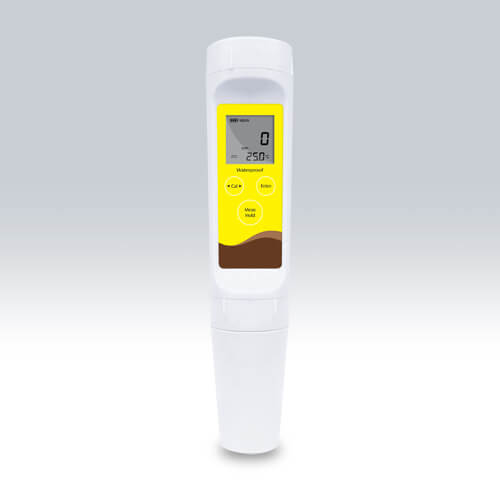
Troubleshooting Common Errors on the YR01814 TDS Meter
The YR01814 Pocket TDS Meter is a versatile tool used for measuring the total dissolved solids (TDS) in various solutions. However, like all electronic devices, it may encounter issues that can hinder its performance. This article focuses on troubleshooting common errors associated with the YR01814 model, offering insights into symptoms, potential causes, and effective solutions.
Technical Data Table for YR01814
| Specification | Details |
|---|---|
| Model | YR01814 |
| TDS Range | 0 to 10,000 ppm |
| Resolution | 0.01, 0.1, 1 |
| Accuracy | ±1% FS |
| Calibration Points | 1 to 3 points |
| Temperature Range | 0 to 60°C / 32 to 140°F |
| Battery Life | Approximately 200 hours |
| Dimensions | 185 (L) × 40 (Diameter) mm |
| Weight | 100 grams |
Common Symptoms and Troubleshooting Solutions
This section categorizes common symptoms that users may encounter with the YR01814, along with probable causes and solutions.
1. Equipment Does Not Power On
If your YR01814 TDS meter does not power on, follow these diagnostic steps:
- Check Battery Installed: Ensure that the batteries are correctly installed and have sufficient charge.
- Inspect Battery Contacts: Clean the battery contacts to eliminate any corrosion or dirt that may cause poor connectivity.
- Replace Batteries: If the battery is depleted, replace it with new AAA batteries.
2. Inconsistent Readings
Inconsistent readings can lead to unreliable results. Consider the following:
- Calibration Issues: Ensure that the device is properly calibrated. Perform a 1 to 3 point calibration with stable TDS solutions.
- Electrode Condition: Check the condition of the electrode. If it is dirty or damaged, replace the electrode module.
- Temperature Effects: Ensure the temperature compensation feature is active, as variations in temperature can affect readings.
3. Error Code E-03 Displayed
Seeing an error code E-03 indicates a calibration error. Here’s how to handle it:
- Verify Calibration Solutions: Make sure you are using appropriate calibration solutions for TDS.
- Restart the Meter: Turn off the meter and turn it back on to reset any temporary issues.
- Recalibrate: Follow the recalibration procedure to reset the calibration points accurately.
4. Auto-Shutoff Malfunction
The YR01814 should shut off automatically after 8 minutes. If it doesn’t:
- Check Settings: Ensure that the auto-off feature is turned on in the configuration menu.
- Insufficient Battery Voltage: Replace batteries if you suspect they may not be supplying sufficient power.
5. Display Malfunctions
Occasionally, the display may not function correctly. To troubleshoot:
- Inspect for Damage: Check if the LCD is cracked or damaged. If so, replacement may be necessary.
- Reset Device: Perform a factory reset to restore default settings.
Symptom-Cause-Solution Table
| Symptom | Possible Causes | Solutions |
|---|---|---|
| Does Not Power On | Dead batteries, poor contact | Replace batteries, clean contacts |
| Inconsistent Readings | Calibration issues, dirty electrode | Recalibrate, clean or replace electrode |
| Error Code E-03 | Calibration error | Verify solutions, restart, recalibrate |
| Auto-Shutoff Malfunction | Settings issue, low battery | Check settings, replace batteries |
| Display Malfunctions | Physical damage, setting errors | Inspect display, perform factory reset |
Frequently Asked Questions
How do I calibrate the YR01814 TDS Meter?
Calibration of the YR01814 involves using standard TDS solutions to ensure accurate measurements. Access the calibration menu to select the number of calibration points, and follow the instructions to immerse the meter in the calibration solutions.
What should I do if my YR01814 displays inaccurate TDS readings?
Inaccurate readings may stem from an uncalibrated device or a malfunctioning electrode. Recalibrate the device using fresh calibration solutions and ensure the electrode is clean and functional.
Can I use the YR01814 in high humidity environments?
The YR01814 is designed to be water-resistant, but prolonged exposure to high humidity may affect its internal components. Ensure the device is dried immediately after use in such conditions.
What are the common maintenance practices for the YR01814?
Regularly clean the electrode, perform periodic calibrations, and replace the batteries as needed to ensure optimal performance. Store the device in a protective case when not in use.
Where can I find replacement parts for the YR01814?
Replacement parts, including electrodes and batteries, can typically be obtained through authorized distributors or directly from manufacturers specializing in laboratory equipment.
Is the YR01814 suitable for industrial use?
Yes, the YR01814 is versatile and can be used in various settings, including industrial applications. However, ensure to follow the operational guidelines and perform regular maintenance.
If you are looking for a fusion of innovation and quality, you have come to the right place. At Kalstein, we offer you the luxury of exploring our exclusive catalog of laboratory equipment. We manufacture every device to the highest standards of excellence. Our intuitive and seamless online purchasing channels are designed for your convenience, securing the most competitive prices. Hesitate no longer — we bring science to life, it is time to become part of our community.