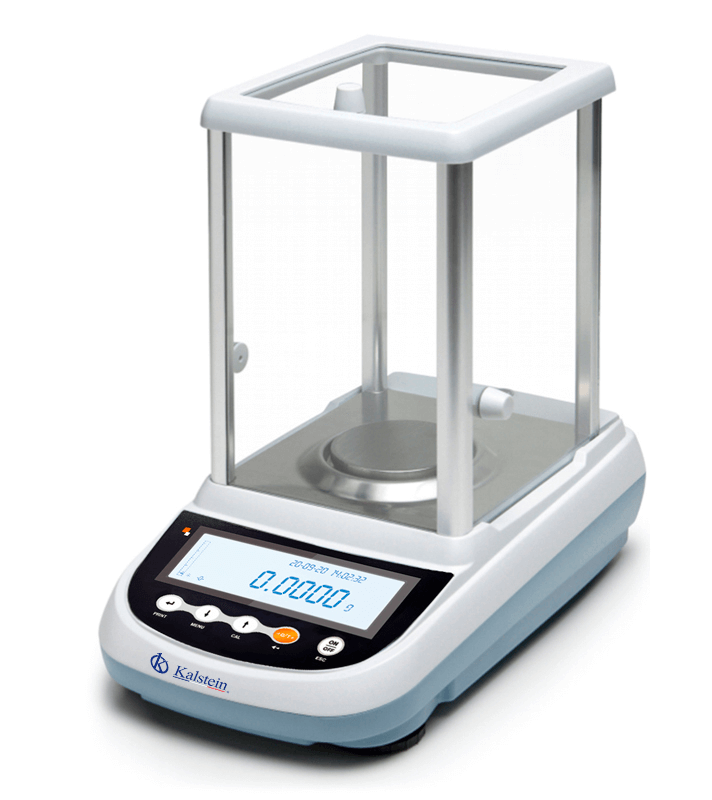
Troubleshooting Common Errors in the YR05570 Analytical Balance
The YR05570 analytical balance is renowned for its precision and reliability in various laboratory applications. However, like any sophisticated equipment, it can experience issues that affect its performance. This guide focuses on common errors associated with the YR05570, providing detailed troubleshooting steps to ensure accurate measurements and prolonged operational life.
Technical Specifications of the YR05570
| Model | Brand | Category | Subcategory | Price USD | Weight (kg) | Dimensions (mm) |
|---|---|---|---|---|---|---|
| YR05570 | Kalstein | Balances | Analytical Balance | 1080.00 | 7 | 345×215×345 |
Common Symptoms and Troubleshooting Steps
The YR05570 can present various symptoms that may indicate an underlying issue. Below is a structured approach to diagnosing and resolving these problems.
| Symptom | Possible Causes | Solutions |
|---|---|---|
| Equipment Does Not Power On | 1. Power cable not connected. 2. Faulty power supply. 3. Internal electrical issue. | 1. Check and secure the power cable. 2. Test with a different power supply. 3. Contact service technician. |
| Error Code E-03 | 1. Calibration failed. 2. Overload error. 3. Internal component failure. | 1. Recalibrate the balance. 2. Remove excess weight. 3. Consult the manual or service. |
| Inconsistent Readings | 1. Drafts affecting measurement. 2. Unstable surface. 3. Dirty weighing pan. | 1. Use windbreak or adjust the environment. 2. Ensure the balance is leveled. 3. Clean the weighing pan thoroughly. |
| Display Shows Erroneous Values | 1. Malfunctioning sensors. 2. Software glitch. 3. Incorrect unit settings. | 1. Restart the device. 2. Update or reset software. 3. Ensure correct unit settings are selected. |
| Calibration Issues | 1. Calibration weights not used. 2. Failure in internal calibration mechanism. 3. Environmental changes. | 1. Use certified calibration weights. 2. Check calibration settings. 3. Stabilize environment before calibrating. |
Understanding Error Codes
The YR05570 provides specific error codes that indicate various issues. Understanding these codes is crucial for effective troubleshooting.
- E-01: Internal sensor malfunction. Check for calibration or replacement.
- E-02: Overload detected. Remove excess weight immediately.
- E-03: Calibration error. Reattempt calibration.
- E-04: Low battery warning. Replace or recharge the battery.
Preventive Maintenance for the YR05570
To minimize errors and prolong the lifespan of the YR05570, regular maintenance is essential. Here are key practices:
- Perform routine calibrations using certified weights.
- Regularly clean the balance to prevent contamination.
- Ensure the balance is located in a stable environment away from drafts.
- Check and tighten all electrical connections periodically.
- Keep a log of maintenance activities and any issues encountered.
Frequently Asked Questions
What should I do if my YR05570 displays an error code?
Refer to the user manual to identify the specific error code and follow the troubleshooting steps provided. If the error persists, contact technical support for further assistance.
How can I ensure accurate measurements with the YR05570?
Ensure the balance is leveled, calibrated regularly, and that the environment is stable, avoiding drafts and vibrations during measurement.
What maintenance is required for the YR05570 balance?
Routine cleaning, calibration checks, and inspections of electrical connections are necessary to maintain optimal performance.
Can I connect the YR05570 to a computer?
Yes, the YR05570 is equipped with an RS232 interface that allows you to connect it to a computer or printer for data transfer.
What are the maximum and minimum weight capacities of the YR05570?
The YR05570 can handle a maximum weight of 410 grams and a minimum weight of 0.4 milligrams.
How often should I calibrate the YR05570?
It is recommended to calibrate the balance before each use and whenever it is moved or after significant temperature changes.
What environmental conditions affect the YR05570's performance?
The balance should be used within a temperature range of 5-35°C and in conditions free from vibrations, drafts, and extreme humidity.
If you are looking for a fusion of innovation and quality, you have come to the right place. At Kalstein, we offer you the luxury of exploring our exclusive catalog of laboratory equipment. We manufacture every device to the highest standards of excellence. Our intuitive and seamless online purchasing channels are designed for your convenience, securing the most competitive prices. Hesitate no longer — we bring science to life, it is time to become part of our community.