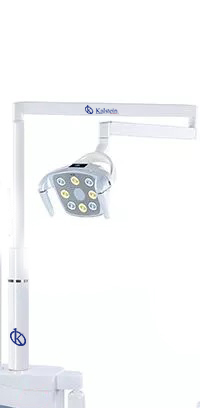
Troubleshooting Common Errors with the YR06012-OP12 Dental Accessories
The YR06012-OP12 dental accessories are essential tools in modern dental practices. However, like any equipment, they may encounter issues that can hinder their performance. This article will delve into common errors associated with the YR06012-OP12 and provide troubleshooting techniques to resolve these issues effectively.
Technical Specifications of YR06012-OP12
| Model | Description | Used for |
|---|---|---|
| YR06012-OP12 | LED lamp RV004-1 with yellow and white light | YR06012 |
Common Symptoms and Their Solutions
This section outlines common symptoms observed with the YR06012-OP12 and their corresponding solutions.
Equipment Does Not Power On
If your YR06012-OP12 does not power on, consider the following potential causes:
- Faulty power supply
- Loose connections
- Defective power switch
To troubleshoot:
- Check the power cord for any visible damage.
- Ensure all connections are secure.
- Test the power outlet with another device.
Error Code E-03
Error code E-03 may indicate an internal malfunction. Follow these steps:
- Turn off the device and unplug it.
- Wait for a minute, then plug it back in.
- If the error persists, consider contacting technical support.
Inconsistent Lighting Output
An inconsistent lighting output can affect performance. Possible causes include:
- Burned-out bulbs
- Voltage fluctuations
To resolve this issue:
- Inspect the bulbs for any signs of damage.
- Verify that the voltage supplied matches the required specifications.
Symptoms to Cause Matrix
| Symptom | Possible Cause | Solution |
|---|---|---|
| Equipment Does Not Power On | Faulty power supply, Loose connections, Defective power switch | Check power supply, Secure connections, Test power switch |
| Error Code E-03 | Internal malfunction | Restart device, Contact support if persists |
| Inconsistent Lighting Output | Burned-out bulbs, Voltage fluctuations | Inspect bulbs, Verify voltage supply |
Frequently Asked Questions
What should I do if my YR06012-OP12 displays an error code?
First, consult the user manual for a specific diagnosis related to the error code. Common solutions include restarting the device or rechecking all connections. If the issue persists, contact technical support.
How can I ensure the longevity of my YR06012-OP12?
Regular maintenance, proper usage, and avoiding excessive force on the device will contribute to its longevity. Periodically check the electrical connections and replace any worn-out parts promptly.
Can I replace the LED bulbs in the YR06012-OP12?
Yes, the LED bulbs in the YR06012-OP12 can be replaced. Refer to the user manual for the correct specifications and replacement procedures.
What are common maintenance practices for the YR06012-OP12?
Common maintenance practices include cleaning the exterior, ensuring connections are tight, and regularly checking for signs of wear or damage. It's also advisable to periodically test the equipment performance.
How do I contact support for the YR06012-OP12?
You can contact support through the official channels provided in your user manual or manufacturer's website. Have your model number and a detailed description of your issue ready to assist the support team.
What should I check if the YR06012-OP12 is flickering?
If the YR06012-OP12 is flickering, check the power supply and connections. Flickering may indicate a problem with the power source or the integrity of the components inside the unit.
How do I obtain replacement parts for the YR06012-OP12?
You can obtain replacement parts through authorized suppliers or directly through the manufacturer. Ensure that you specify the model YR06012-OP12 when ordering parts.
If you are looking for a fusion of innovation and quality, you have come to the right place. At Kalstein, we offer you the luxury of exploring our exclusive catalog of laboratory equipment. We manufacture every device to the highest standards of excellence. Our intuitive and seamless online purchasing channels are designed for your convenience, securing the most competitive prices. Hesitate no longer — we bring science to life, it is time to become part of our community.