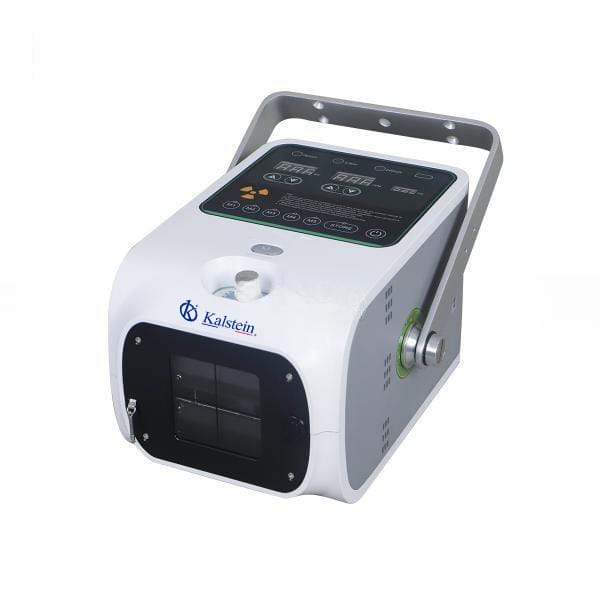
Troubleshooting Common Errors on the YR06161 Digital Portable X-ray System
The YR06161 Digital Portable X-ray System is a cutting-edge device designed for veterinary applications, offering high mobility and advanced imaging capabilities. Despite its robust engineering, users may encounter various errors that can hinder optimal performance. This guide will help you identify common symptoms, their probable causes, and effective solutions to ensure smooth operation.
Technical Data for YR06161
| Specification | Detail |
|---|---|
| Model | YR06161 |
| Power Supply | AC 220V/110V ±10% 50 / 60 Hz |
| Power (kW) | 1.6 |
| kV Range | 50 ~ 90 |
| mAs | 20 |
| mA | 20 |
| Weight (kg) | 7 |
| Communication | RS232/Bluetooth |
Common Symptoms and Troubleshooting Solutions
Equipment Does Not Power On
If your YR06161 does not power on, follow these diagnostic steps:
- Check the power supply connections.
- Ensure the battery is charged and properly connected.
- Inspect for any blown fuses in the power circuit.
- Examine the power switch for functionality.
Common causes include:
- Defective power supply.
- Faulty battery connections.
Solution: Replace or repair the power supply unit as necessary.
Error Code E-03 Displayed
Error code E-03 typically indicates an issue with the exposure control. To troubleshoot:
- Verify the exposure settings are correctly configured.
- Check for any software updates available for the device.
- Inspect the connections to the exposure control unit.
Probable causes include:
- Outdated firmware.
- Connection issues between the control unit and the main device.
Solution: Update the firmware and ensure all connections are tight.
Inconsistent Readings
Inconsistent imaging results can be frustrating. To diagnose:
- Ensure proper positioning of the subject.
- Check for interference from external devices.
- Confirm the calibration settings are correct.
Common causes of inconsistent readings:
- Poor positioning or movement during exposure.
- Calibration errors.
Solution: Reposition the subject and recalibrate the device.
| Symptom | Possible Cause | Solution |
|---|---|---|
| Equipment Does Not Power On | Defective power supply, faulty battery connections | Replace or repair power supply |
| Error Code E-03 Displayed | Outdated firmware, connection issues | Update firmware, check connections |
| Inconsistent Readings | Poor positioning, calibration errors | Reposition subject, recalibrate |
Frequently Asked Questions
What should I do if the YR06161 shows an error code?
First, consult the user manual for the specific error code. Each code corresponds to a diagnostic guideline that can help you troubleshoot effectively. If necessary, contact technical support for further assistance.
How can I extend the battery life of the YR06161?
To prolong the battery life, ensure that the device is powered off when not in use, keep it charged according to the manufacturer's recommendations, and avoid exposing it to extreme temperatures.
What types of imaging can I perform with the YR06161?
The YR06161 is optimized for a variety of veterinary applications, including equine imaging, and is suitable for use in locations such as racecourses and veterinary hospitals.
Is it possible to connect the YR06161 to other devices?
Yes, the YR06161 can connect to tablets via Bluetooth for real-time parameter adjustments and data management.
What are the maintenance requirements for the YR06161?
Regular maintenance includes checking the battery condition, cleaning the x-ray tube, and ensuring all connections are secure. Refer to the user manual for detailed maintenance schedules and procedures.
How do I calibrate the YR06161?
Calibration involves following the specific steps provided in the user manual to ensure accurate imaging and measurements. Consistent checks are recommended to maintain performance.
If you are looking for a fusion of innovation and quality, you have come to the right place. At Kalstein, we offer you the luxury of exploring our exclusive catalog of laboratory equipment. We manufacture every device to the highest standards of excellence. Our intuitive and seamless online purchasing channels are designed for your convenience, securing the most competitive prices. Hesitate no longer — we bring science to life, it is time to become part of our community.