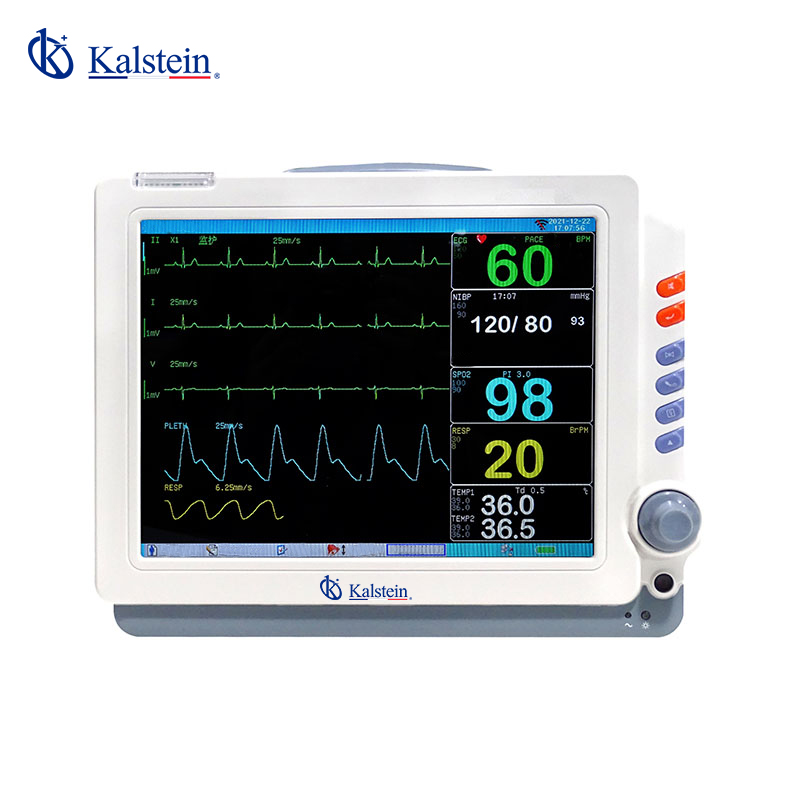
Installation and Commissioning Guide for the YR02171 Patient Monitor
The YR02171 Patient Monitor stands out with its advanced features, making it a vital tool in clinical settings. This guide provides an in-depth look at the installation and commissioning process to ensure the device operates at its full potential. Proper setup is crucial for accurate monitoring and efficient workflow in healthcare environments.
Unboxing and Initial Setup
Begin the installation process by carefully unboxing the YR02171 Patient Monitor. Ensure that the following components are present:
- YR02171 Patient Monitor unit
- Power supply and cable
- User manual
- ECG leads
- Mounting hardware (if applicable)
Inspect each component for any damage during shipping. If any parts are missing or damaged, contact your supplier immediately. Position the monitor at a suitable height for visibility and accessibility.
Anchoring and Leveling the Device
For secure installation, the YR02171 can be mounted on a wall or mounted on a rolling stand. If wall-mounted, ensure that the mounting hardware is anchored into a stud or appropriate wall fixture. Use a level tool to confirm that the monitor is installed straight, which is essential for accurate display readings.
Power-Up Sequence and Initial Calibration
Once the device is securely installed, connect it to the power source. Follow these steps for powering up:
- Plug the power supply into an electric outlet.
- Connect the power cable to the back of the monitor.
- Press the power button to turn on the device.
Upon turning on, the monitor will undergo a self-diagnostic test. If the device passes the test, you will be prompted to complete the initial calibration:
- Access the setup menu using the touchscreen interface.
- Follow on-screen instructions for calibration, which may include adjusting the ECG leads and ensuring proper sensor placement.
Network and USB Setup
For optimal functionality, the YR02171 supports both wired and wireless network connections. To configure the network settings:
- Navigate to the network setup menu.
- Choose either wired or wireless settings based on your needs.
- If using a wireless connection, select the desired network and enter the password.
A successful connection is essential for data sharing and integration with hospital information systems.
Validation of First Measurements
After calibration and network setup, it is important to validate the first measurements taken by the YR02171. Ensure the following:
- Verify the accuracy of the heart rate and respiration readings against a standard.
- Check that the alarms are functioning correctly, including apnea and arrhythmia alerts.
Conduct tests using known reference values to ensure that the monitor is providing accurate readings. This step is crucial for patient safety and effective monitoring.
Common Setup Mistakes and Troubleshooting
During the installation and commissioning process, users may encounter common mistakes. Here are some to watch out for:
- Incorrect lead placement: Ensure that ECG leads are connected correctly to avoid erroneous readings.
- Network connection issues: Double-check network settings if the monitor fails to connect.
- Calibration errors: Follow calibration instructions precisely to ensure accuracy.
For troubleshooting, refer to the following matrix:
| Symptom | Probable Cause | Solution |
|---|---|---|
| Device does not power on | Power cable not connected | Ensure the power supply is plugged in and the outlet is functional. |
| Error code E-03 | Lead connection issue | Check all lead connections and ensure proper placement. |
| Inconsistent readings | Calibration not performed | Re-calibrate the device following the initial setup instructions. |
Technical Specifications of the YR02171
| Model | YR02171 |
|---|---|
| Brand | Kalstein |
| Category | Patient Monitor |
| Price USD | 358.00 |
| Gross Weight | 3.2 kg |
Frequently Asked Questions
What features make the YR02171 Patient Monitor suitable for clinical use?
The YR02171 features a multi-channel display, large source interface, ST segment and arrhythmia analysis, dynamic OxyCRG visualization, and apnea alarm monitoring, making it ideal for diverse clinical applications.
How can I ensure accurate calibration of the YR02171 Patient Monitor?
Accurate calibration requires following the device's specific instructions, ensuring correct sensor placement, and validating measurements against known reference values.
What network configurations are supported by the YR02171 Patient Monitor?
The monitor supports both wired and wireless network configurations, ensuring seamless integration with hospital information systems for data sharing and patient management.
What should I do if the YR02171 displays an error code?
If an error code is displayed, refer to the user manual for a troubleshooting guide that outlines probable causes and solutions for each specific error code.
Can the YR02171 Patient Monitor be used in emergency settings?
Yes, the YR02171 is designed for versatility and can be effectively utilized in emergency settings due to its rapid setup and advanced alert systems.
What are the maintenance requirements for the YR02171 Patient Monitor?
Regular maintenance includes checking cable integrity, ensuring software updates, and following periodic calibration schedules to maintain accuracy and performance.
Where can I obtain a quote for the YR02171 Patient Monitor?
You can request a quote for the YR02171 Patient Monitor through our secure online channels, ensuring you receive the most competitive pricing.
If you are looking for a fusion of innovation and quality, you have come to the right place. At Kalstein, we offer you the luxury of exploring our exclusive catalog of laboratory equipment. We manufacture every device to the highest standards of excellence. Our intuitive and seamless online purchasing channels are designed for your convenience, securing the most competitive prices. Hesitate no longer — we bring science to life, it is time to become part of our community.